

The Quadient iX-4 is a connected franking machine aimed at offices wanting a clearer interface and greater envelope-processing capacity than an entry-level meter. Its vertical touchscreen, weighing options and accounting features make it a plausible shortlist choice for a growing administrative team.
It needs careful specification checking, however. A higher printing rate does not automatically mean automatic stack feeding, and optional software or scales can change the price substantially. This UK review explains what the manufacturer publishes, what requires a quotation and how to test whether the upgrade creates useful value.
Quadient iX-4 specifications at a glance
| Feature | Cited UK brochure specification |
|---|---|
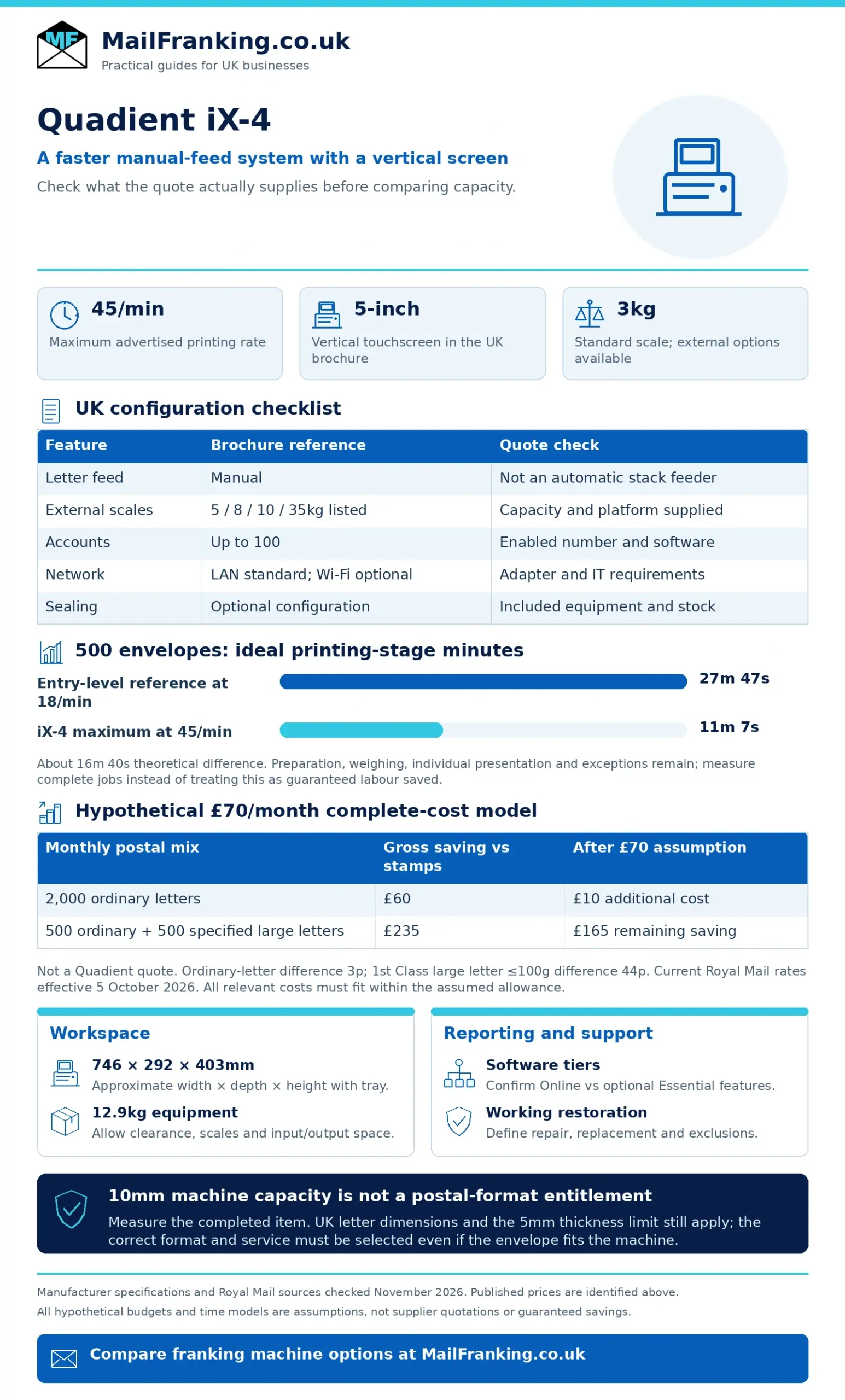
| Maximum printing rate | Up to 45 letters per minute |
| Letter feeding | Manual |
| Touchscreen | 5-inch vertical display |
| Standard weighing | 3kg platform |
| External weighing options | 5kg, 8kg, 10kg and 35kg listed |
| Physical envelope thickness | Up to 10mm |
| Accounts | Up to 100; confirm enabled package |
| Job favourites | Nine |
| Advertising messages | Ten |
| Connectivity | LAN standard; Wi-Fi optional |
| Dimensions with tray | 292mm length × 746mm width × 403mm height |
| Weight | 12.9kg |
The official UK iX-4 brochure provides these details. The UK product page also describes the vertical interface and 45-letter-per-minute rate. Specifications and options should be matched to the exact machine and quotation rather than assumed from a family name.
Quadient announced the newer iX-4, iX-6 and iX-8 for the UK in November 2025. Do not confuse an iX-4 quotation with an older iX-3, or assume that a similarly named overseas product has the same UK scales, postage software and support arrangements.
- Takes 2 minutes
- Receive quotes to compare
- Easy and no commitment
Is the iX-4 manual or automatic?
The UK brochure’s specification table identifies letter feeding as manual. An operator therefore still has a role presenting individual envelopes. Wider marketing categories can use terms such as assisted or semi-automatic, but these should not be interpreted as a promise of unattended stack feeding.
Ask the supplier to demonstrate the feed stage without skipping the preparation. Who picks up each envelope? Does the machine separate a stack? Can it seal as configured? What happens if the batch includes different thicknesses? These practical questions establish what the advertised speed means in your office.
A higher-speed manual system can still be useful. A clear interface, consistent transport and convenient weighing may make a repetitive job easier. The important point is to evaluate the improvement that actually occurs, rather than buying on an assumed automation feature.
Businesses specifically seeking stack handling should compare the iX-6 HF and AF configurations and request an exact explanation of their differences. Our manual versus automatic guide covers the wider distinction between transport, feeding, sealing and weighing.
- Give your requirements
- Receive quotes to compare
- Choose a provider or walk away - your choice!
How much does the Quadient iX-4 cost?
The official UK information reviewed does not provide a fixed public purchase or rental price. The iX-4 should therefore be treated as quote-only for this comparison. We have not substituted a price for another model or converted a third-party teaser into a verified current manufacturer tariff.
Request a fully itemised offer showing the base machine, scale, tray, connectivity equipment, sealing option, account licences, software, installation, training and service. If a price is expressed weekly, obtain the actual payment schedule and total payable. Check whether VAT, initial charges and annual increases are additional.
The following is a hypothetical £70-per-month complete-cost scenario, not an iX-4 quote. It illustrates how mail mix changes the result even when the equipment allowance stays the same.
| Monthly mix and baseline | Gross postage difference | After assumed £70 complete cost |
|---|---|---|
| 2,000 ordinary letters at 3p below stamps | £60 | £10 additional cost |
| 500 ordinary letters plus 500 qualifying large letters against stamps | £235 | £165 remaining saving |
| The same mix against the relevant standard online prices | £185 | £115 remaining saving |
The large-letter rows use 1st Class items up to 100g, with a 44p stamp difference or 34p standard online difference. They do not apply to every large letter. The monthly allowance must genuinely include all relevant equipment and running costs for the remaining balance to represent the complete result.
At an unchanged £70 a month, five years totals £4,200. That simple arithmetic excludes any deposit, price increases or costs outside the assumed allowance. A supplier quote can be higher or lower, and the contract may have a different length or ownership arrangement.
Current postage differences to use
The Royal Mail Mailmark wallchart, effective 5 October 2026, prices ordinary letters up to 100g at £1.77 for 1st Class and 88p for 2nd Class. Corresponding stamps are £1.80 and 91p. That is a 3p saving per ordinary letter before the cost of the system.
The larger difference for a 1st Class large letter up to 100g is £3.30 by stamp less £2.86 Mailmark, or 44p. The standard online price is £3.20, reducing the difference to 34p. Use the route your business would actually buy without the machine.
Break-even at the illustrative £70 monthly cost is 2,334 ordinary letters at 3p, 160 qualifying large letters at 44p, or 206 at 34p, rounding each result up. A single “letters per day” recommendation cannot capture that spread.
Where your business uses tracked parcels or a qualifying business-mail product, obtain the corresponding product comparison. Do not replace a tracked shipping service with an ordinary postage rate in the spreadsheet while ignoring tracking, compensation, delivery aims or VAT differences.
Does 45 letters per minute save much time?
At the maximum continuous rate, 500 envelopes take about 11 minutes seven seconds to print. At an entry-level reference of 18 letters per minute, the same number takes about 27 minutes 47 seconds. The idealised printing-stage difference is roughly 16 minutes 40 seconds.
Those figures are not guaranteed end-to-end savings. If staff spend 50 minutes printing documents, folding and inserting, changing the franking stage does not remove that work. Mixed formats and individual weighing can also reduce the time spent operating at the maximum rate.
Use a stopwatch on a representative batch with the same preparation assumptions for both machines. Record operator involvement, mistakes, service selection and output handling. Repeat only where a real difference in staff experience or mail mix needs testing, rather than treating a polished sales demonstration as typical production.
Suppose a measured improvement releases 20 minutes on eight monthly batches. That is 160 minutes, or two hours 40 minutes. At an assumed £18 an hour it represents £48 of staff capacity. It becomes a direct cash saving only where an actual cost is avoided.
Touchscreen, favourites and operator checks
The 5-inch vertical touchscreen is a visible difference from older control-panel designs. Its usefulness depends on clarity for your staff, not just screen size. Test whether common products and accounts are easy to find, and whether the displayed price and format can be checked before printing.
Nine favourite jobs can reduce repetitive selections. Name them clearly and keep them aligned with actual mailing tasks. A favourite set for a light invoice envelope must not be used automatically after adding a brochure or choosing a larger envelope.
Train at least one backup operator and keep the supplier support details accessible. Include how to check balances, change the service, avoid duplicate printing and report a fault. Good everyday controls are more useful than a long list of features that nobody understands.
If the system supports printed advertising messages, request a sample using your proposed artwork and envelope stock. Confirm file preparation, charges and account permissions. A message facility is separate from parcel-label software and does not establish shipping integration by itself.
Scales, envelopes and workspace
The UK brochure lists a 3kg standard scale and several external capacity options. Choose capacity and platform size for finished items, rather than buying the largest scale simply because it is available. A regular 8kg parcel requirement cannot be solved by a quoted 3kg platform.
The physical 10mm envelope thickness allowance is a machine-handling specification. It does not change the 5mm limit for ordinary UK letter format or other postal product rules. Measure length, width and thickness as well as weight, using the finished envelope and all its contents.
Allow working room around the stated dimensions with tray: roughly 746mm across, 292mm deep and 403mm high, using the brochure’s labelled orientation. Include space for incoming work, completed mail, the scale and any separate label equipment. Check that the furniture is suitable for the 12.9kg unit and normal use.
Where the brochure lists optional sealing and manual label-sheet handling, ask what is actually supplied. A sealing capability may need an accessory or specific consumable arrangement. The correct demonstration should include the exact setup your staff will receive.
Accounting and connected reporting
Up to 100 accounts are listed, but the enabled number and any licensing need confirmation. A small team may need only a few cost centres; a larger organisation may require controls and exports. Request an example showing the information your finance team actually needs.
The brochure distinguishes bundled S.M.A.R.T. Online from optional S.M.A.R.T. Essential features. Ask which reporting functions and subscriptions are included, how long data remains available and whether exports continue if the subscription ends. Do not assume every function shown in a sales demonstration is standard.
LAN is standard and Wi-Fi optional in the cited UK specification. Have the supplier check connectivity requirements against your network before installation. Establish who handles password changes, office moves and security-policy updates, and how support is accessed if the connection fails.
For parcel services and the listed special-service barcode capabilities, obtain an exact supported-product list and demonstration. Printing a barcode or postage mark does not establish that every tracked product, customs function or e-commerce integration is included. Keep the required parcel workflow separate from general envelope throughput.
Service and whole-contract costs
Request current prices for compatible ink, labels and any sealing supplies. Ask what an impression-yield estimate assumes and whether additional messages change consumption. Include delivery charges and the cost of consumables held as spare stock where relevant to your business.
Service cover should identify parts, labour, travel, response targets and the route to a working replacement. “Next working day” can refer to different stages of support. Read the exclusions and agree an alternative posting process for urgent mail during an outage.
Check postage-funding arrangements independently. Find out whether downloads, invoices or account activity attract charges, how the payment method works and how unused balances are recovered. A competing manufacturer’s account tariff is not evidence of the fees on a Quadient proposal.
For rental or finance, record the minimum term, notice deadline, renewal provisions and end-of-term return or ownership position. Match the term to realistic future volumes. A generous capacity margin can become an expensive commitment if the business moves more correspondence online.
Our assessment
The iX-4 merits consideration where its interface, weighing options and higher manual processing rate address a demonstrated office need. It should be compared with the iX-1 for lower volumes and with a confirmed stack-fed configuration where reducing individual handling is the main objective.
This review uses published UK manufacturer material and current tariff calculations, not hands-on testing or a hidden supplier price. Ask for real-mail demonstrations and itemised quotations. The best outcome is an appropriately configured system whose measured benefits justify its full cost, rather than the highest advertised throughput you can afford.
Frequently asked questions
The cited UK brochure identifies letter feeding as manual. Do not interpret its higher maximum speed or broader marketing categories as proof of an automatic stack feeder. Ask the supplier to demonstrate exactly how envelopes enter, travel, seal and exit on the quoted configuration, using a representative mixed batch.
Quadient advertises up to 45 letters per minute. That is a maximum processing figure, not a guaranteed complete-job rate. Preparation, inserting, weighing, changing services and operator handling add time. A timed trial should measure the entire mailing process and identify which tasks the proposed system actually improves.
The official UK information reviewed uses quotations rather than a fixed public purchase or rental tariff. Request an itemised price for the exact machine, accessories, software, service and contract. The £70 monthly scenario in this guide is an explicit budgeting example, not an advertised Quadient price.
The cited UK brochure lists a 3kg standard scale and external options of 5kg, 8kg, 10kg and 35kg. Confirm what your offer includes and whether an accessory is required. Platform size, placement and your heaviest finished items matter alongside the headline weighing capacity.
The brochure lists up to 100 accounts and distinguishes reporting software options. Ask how many accounts and which exports are enabled in the quoted package, including subscription charges. Test the finance report with sample departments and ensure staff can select the correct account consistently before printing postage.
No. Ordinary-letter Mailmark savings against stamps are currently only 3p per item up to 100g, while some large-letter differences are larger. Calculate your actual mix and subtract complete equipment, consumable and account costs. Include handling benefits separately and distinguish released staff capacity from cash expenditure that will genuinely disappear.