

The Pitney Bowes SendPro Mailstation is a compact, manually fed franking machine aimed at small offices. It can print paid postage directly onto suitable envelopes and labels, with connected rate updates and an integrated weighing platform. It is worth considering if you want a dedicated mailing station without buying a larger mailroom system.
The buying decision depends on your mail mix. Since ordinary UK letter discounts are much smaller than some large-letter discounts, a business sending invoices in standard envelopes can reach a different answer from one sending thicker documents. This review separates the machine’s capabilities, published refurbished prices and realistic running-cost calculations.
SendPro Mailstation at a glance
| Feature | UK specification or buying consideration |
|---|---|
| Feeding | Manual: present envelopes individually |
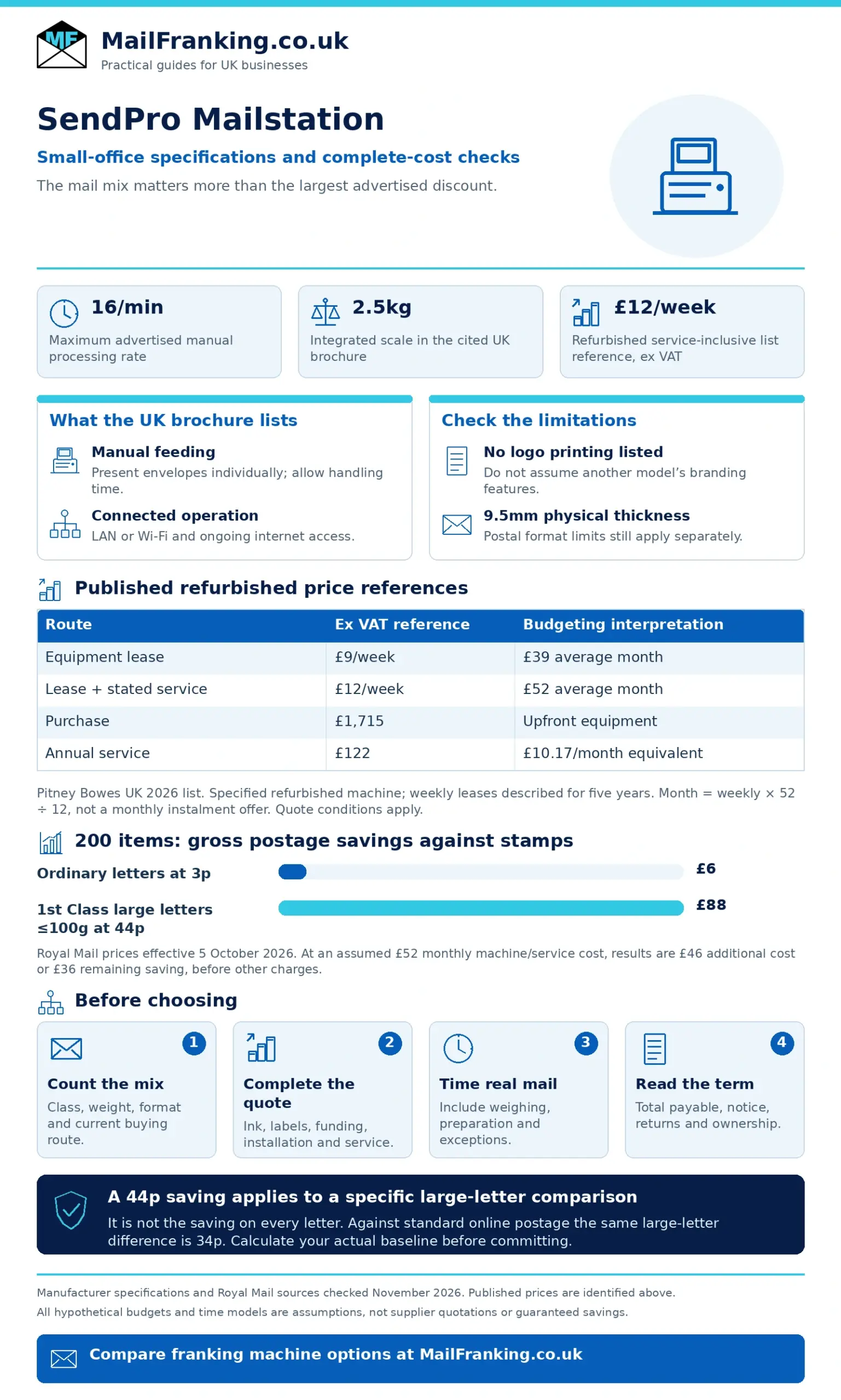
| Maximum advertised speed | Up to 16 letters per minute |
| Screen | 4.3-inch colour touchscreen |
| Weighing | Integrated 2.5kg platform |
| Connectivity | Wired network or Wi-Fi; ongoing internet access required |
| Physical envelope thickness | Up to 9.5mm in the cited brochure |
| Envelope sizes | From 76 × 127mm to 330 × 381mm |
| Branding | The cited UK Mailstation brochure says logo printing is unavailable |
| Best comparison | Complete cost against your current postal products and preparation process |
These specifications come from the UK Mailstation brochure and the manufacturer’s UK buying guide. The brochure contains historical promotions, which we have excluded from the pricing analysis. Ask the supplier to identify the exact machine, scale and software package being quoted.
“Up to 16” describes a processing rate under suitable conditions, rather than a promise that an entire job will take one minute per 16 envelopes. Printing documents, folding, inserting, checking dimensions, changing services and dealing with exceptions all take additional time.
- Takes 2 minutes
- Receive quotes to compare
- Easy and no commitment
What does the SendPro Mailstation cost?
Pitney Bowes publishes a UK equipment price brochure covering specified refurbished configurations. Its Mailstation Refurbished entry provides a useful manufacturer reference, although a refurbished price is not a new-machine quotation. The brochure describes weekly lease figures for a five-year arrangement and prices excluding VAT.
| Published refurbished reference | Excluding VAT | Budgeting interpretation |
|---|---|---|
| Equipment lease only | £9 per week | £39 per average calendar month |
| Lease including the stated Inclusive Service | £12 per week | £52 per average calendar month |
| Purchase | £1,715 | Upfront equipment reference |
| Annual Inclusive Service | £122 | £10.17 per month when divided by 12 |
The manufacturer’s 2026 price brochure is the source for these figures. Monthly equivalents use weekly price × 52 ÷ 12; they are not advertised monthly instalments. Confirm eligibility, initial payments, minimum term, total payable and end-of-term arrangements in the actual agreement.
At £12 a week, a simple 260-payment illustration totals £3,120 before VAT, postage and other applicable charges. Buying at £1,715 and adding five years of £122 service gives £2,325 before other costs. These are different ownership and finance routes: the lower arithmetic total does not establish identical cover or contractual rights.
Ask whether installation, delivery, operator training, rate updates, software access and support are included. Keep a copy of the signed equipment schedule and the service terms together, so future renewal or cancellation decisions can be checked against the original offer. Check any annual increases and what happens after the minimum term. A short weekly headline can conceal a much larger commitment when the agreement covers five years.
- Give your requirements
- Receive quotes to compare
- Choose a provider or walk away - your choice!
How much postage can it actually save?
The current Mailmark tariff must be compared with the product you would otherwise purchase. The Royal Mail Mailmark wallchart, effective 5 October 2026, lists ordinary 1st Class letters up to 100g at £1.77 and ordinary 2nd Class letters up to 100g at 88p. The corresponding stamp prices are £1.80 and 91p: a 3p difference per item.
The contrast is stronger for a 1st Class large letter up to 100g. Mailmark costs £2.86 against £3.30 by stamp, giving 44p gross postage saving. Against the £3.20 standard online price, the difference is 34p. Both comparisons are legitimate, but they answer different questions.
| Monthly mailing example | Gross postage saving | After an assumed £52 machine/service cost |
|---|---|---|
| 200 ordinary letters at 3p saving | £6 | £46 additional cost |
| 200 qualifying 1st Class large letters against stamps | £88 | £36 remaining saving |
| 200 of those large letters against standard online postage | £68 | £16 remaining saving |
The £52 assumption uses the listed refurbished service-inclusive weekly reference converted to a monthly budget. It excludes ink, funding charges, labels and staff time. A positive result is therefore not a final net saving, while a negative result means postage differences alone do not cover even that equipment allowance.
To cover £52 at 3p per item takes 1,734 ordinary letters when rounded up. At 44p it takes 119 qualifying large letters; at 34p it takes 153. Use your actual formats and current purchasing method rather than a single advertised “save up to” figure. Our franking savings calculator explains the wider calculation.
Is it suitable for a small office?
Pitney Bowes positions Mailstation towards lower daily volumes, with its buying guide indicating up to 20 pieces per day as a selection guide. That is a recommendation, not an automatic technical stop at the twenty-first envelope. Concentrated mailing days and unusual items can matter more than an average volume.
For a business posting ten straightforward invoices daily, the main attractions may be convenience, consistent postage selection and avoiding trips to buy stamps. Those benefits can be valuable, but they should be assessed alongside a cost comparison rather than presented as guaranteed cash savings.
For 300 mixed envelopes prepared in one weekly session, handling and the small-machine workflow deserve a demonstration. Take finished samples and time the entire task. If every envelope requires a different service or weight, the nominal printing rate becomes a relatively small part of the job.
The footprint also needs checking. The brochure gives the main device as approximately 305 × 254 × 203mm. Adding the scale stand changes the space required, and envelopes need clear entry and exit areas. Measure the operational space rather than finding a shelf that only fits the bare casing.
Weighing, dimensions and postal formats
A 2.5kg scale can weigh many office items, but the weight capacity does not define which services the meter can buy or which parcels should be printed through the envelope path. For a box, you may need a postage label and a separate shipping workflow.
The machine’s maximum physical envelope thickness is also different from Royal Mail’s format limits. A UK letter must remain within the letter dimensions and 5mm thickness rule; a large letter has different dimensions and a 25mm thickness limit. A thin-looking pack can still require large-letter postage because of its width or length.
Keep a format guide beside the scale and assess the completed envelope, including inserts. Do not weigh an empty envelope and add a guessed document weight. A correct weight with the wrong format or product can still produce insufficient postage and a surcharge.
Consider scale placement and access for awkward items. A removable or external platform can be more convenient for bulky goods, depending on the system. The appropriate comparison for frequent parcels may be a dedicated label-printing setup, covered in our guide to franking machines for parcels.
Connectivity and everyday use
Mailstation is a connected device, so confirm that its location has a suitable network connection. Establish who will manage Wi-Fi passwords, firewall changes and replacement routers. An office move or security-policy change can interrupt a previously reliable postage process.
Ask for a demonstration of weighing, selecting class and format, checking the displayed price, printing and correcting a mistake. Presets can reduce repeated selections, but they need sensible names and operator checks. A preset left on a higher-priced service can cost more than a few seconds saved at the screen.
The cited brochure describes companion desktop software for functions including parcel work and reporting. That does not mean every shipping feature runs directly on the meter’s touchscreen or that every online Royal Mail product is available in every subscription. Request a written feature list for the quoted package.
Branding deserves particular care: the Mailstation brochure states that logo printing is unavailable. If your envelopes must carry a company logo in the postage area, have that requirement demonstrated on the exact proposed device. Avoid assuming that a feature common to other franking models automatically exists here.
Ink, credit and other running costs
AutoInk is promoted for Mailstation, but the commercial arrangement should be checked rather than inferred from a product name. Ask what triggers a supply, how the subscription is charged, whether carriage is included and what happens if usage falls. Historic ink prices in old brochures are not reliable current quotations.
Printed labels add a separate cost where envelopes cannot go through the meter. Obtain prices and pack quantities for genuine compatible supplies, then calculate a per-item cost. A business printing directly on envelopes most days will have a different consumables budget from one labelling every item.
Funding arrangements can add charges. The cited Pitney Bowes list includes a £8.75 plus VAT refill reference for specified arrangements, with a different £13 plus VAT figure for the stated invoice-paid PrePay arrangement. Your account or bundle may differ, so do not add either automatically without checking its applicability.
At twelve applicable £8.75 charges a year, the fee totals £105 excluding VAT. That is significant next to a small office’s annual postage saving. Our guide to franking postage credit and refunds explains how to separate money held for postage from supplier fees and equipment payments.
Service, ownership and contract checks
“Service included” should lead to a cover schedule, not an assumption that every event is covered. Check response times, parts, labour, accidental damage, consumable exclusions and whether repair or replacement is the remedy. Ask how you would send urgent mail during an outage.
For a refurbished unit, establish who refurbished it, the warranty, the condition standard and what equipment is supplied. Check that the exact serial number can be licensed and maintained by an authorised provider. An inexpensive second-hand box without a viable support route can be poor value.
Keep the equipment agreement distinct from the postage account and any finance contract. Cancellation of one may not automatically close the others. Record the notice date, return requirements, unused-credit procedure and responsibility for secure collection or delivery.
Our assessment and alternatives
Mailstation merits a shortlist for a small office wanting straightforward manual franking, especially where large letters make up a worthwhile share of post. Its strongest case is a practical combination of workflow convenience and verified savings, supported by a suitably priced contract.
An office sending mainly ordinary letters should compare it carefully with online postage and stamps. At a 3p difference, a small mailing volume produces little room for equipment charges. Higher throughput, logo printing or more extensive parcel integration may justify comparing the SendPro C and SendPro+ instead.
We based this review on published UK manufacturer information, the specified refurbished price list and current Royal Mail tariffs, rather than hands-on testing. Obtain a written quote and a demonstration using real mail before choosing. Compare the Mailstation, iX-1 and PostBase Mini on the same complete-cost basis.
Frequently asked questions
Pitney Bowes’ cited 2026 refurbished list shows £9 per week for equipment or £12 including the stated service, excluding VAT. It also lists £1,715 purchase and £122 annual service. Confirm the exact configuration, five-year lease terms, eligibility and additional charges; these are manufacturer references, not a personalised new-machine quote.
The UK brochure advertises up to 16 letters per minute with manual feeding. Real job times include preparation, weighing, format selection, inserting and exceptions. Test a representative batch rather than dividing its size by the maximum speed and assuming that gives the complete processing time.
The cited UK Mailstation brochure states that logo printing is unavailable. Do not assume it supports that feature because another franking machine does. If branding is important, request a live sample from the exact proposed configuration and consider another model with confirmed advertising or logo-printing capability.
Current ordinary Mailmark 1st and 2nd Class letter prices up to 100g are 3p below the corresponding stamps. Larger savings apply to some large-letter comparisons. Equipment, consumables and funding charges still need covering, so an individual postage discount does not establish a net saving for the business.
The system’s 2.5kg weighing capacity does not mean boxes feed through the meter or every parcel product is available on-screen. Check the included companion shipping software, compatible labels and supported services. Compare the full parcel workflow with online shipping, including order handling, tracking, collections and printing costs.
Yes, the cited UK information describes connected operation using LAN or Wi-Fi and ongoing internet access. Check coverage, network restrictions and your supplier’s requirements before installation. Include router changes, office moves and an alternative posting method in the operating plan so connectivity problems do not leave urgent mail unprepared.