

Choosing between manual and automatic franking machines is a decision about handling as well as printing speed. A compact meter can be entirely suitable for a small office, while a busy mailroom may gain more from removing repeated envelope presentation than from a slightly faster print mechanism.
The terminology is not always consistent between suppliers. This guide explains which tasks can be automated, how to compare real batch times and how to calculate whether the additional equipment cost is justified by your workload.
What manual, assisted and automatic mean
| Description | Typical operator involvement | What still needs checking |
|---|---|---|
| Manual feeding | Staff present individual envelopes | Transport, supported stock and practical speed |
| Power-assisted or semi-automatic | Machine assists transport; individual presentation may remain | Exactly which handling stage is assisted |
| Automatic stack feeding | Feeder separates and transports a prepared stack within supported limits | Mixed-mail handling, replenishment, rejects and output |
| Automatic sealing | Supported envelope flaps are moistened and sealed | Included accessory, stock compatibility and supplies |
| Stack or differential weighing | Scale process reduces repeated weighing actions | Exact option, workflow and operator steps |
These functions are separate. A machine can transport envelopes automatically without accepting a stack, or feed a stack without including every sealing or weighing feature. Ask the supplier to show each stage on the exact proposed configuration and write the result into the specification.
Do not infer features from a higher model number or a marketing category. The Quadient iX-4 UK brochure, for example, lists manual letter feeding despite its up-to-45-letter-per-minute rate. The iX-6 brochure distinguishes HF semi-automatic from AF automatic feeding.
- Takes 2 minutes
- Receive quotes to compare
- Easy and no commitment
When a manual machine makes sense
A manual machine can suit modest batches, occasional use and an office where mail is already prepared individually. Its smaller operational footprint and simpler handling arrangement may be convenient. The important question is whether presenting envelopes remains a minor task at your actual volume.
For ten letters a day, a stack feeder may remove little useful work. Setup, checking the service and dealing with exceptions can take longer than the printing itself. A lower-cost manual system or online postage may meet the requirement without a larger equipment commitment.
Manual feeding can also remain practical for varied or awkward items, provided they fall within the machine’s physical limits. A bigger automated system does not eliminate the need to identify exceptions. Compare how each proposal handles your real mix rather than assuming automation handles everything.
The SendPro Mailstation and Quadient iX-1 are examples to investigate at the compact end. Their advertised maximum rates are 16 and 18 letters per minute respectively in the cited UK information. Complete job times will be longer than continuous printing calculations.
- Give your requirements
- Receive quotes to compare
- Choose a provider or walk away - your choice!
When stack feeding becomes useful
Automatic stack feeding becomes more attractive where staff spend substantial recurring time presenting uniform envelopes. A feeder can reduce repetitive actions and allow attention to shift towards checking output or preparing the next batch, within the supplier’s operating and supervision requirements.
The benefit depends on batch size and frequency. Saving 40 minutes once a quarter has a different value from saving 40 minutes every working day. A monthly average volume can hide the difference between a few large campaigns and many small intermittent jobs.
Ask how much mail fits in the feeder, how it is replenished and what happens with different thicknesses or envelope flaps. Include clearing output trays and handling rejections in the timed test. A stack fed quickly at the start may still need frequent intervention elsewhere.
For mixed weights, weigh-and-print workflow can be the limiting factor. Confirm whether differential weighing, dynamic weighing or another option is actually supplied. Do not describe a machine as automatically weighing every moving envelope unless that capability is explicitly supported and demonstrated.
Printing speed is only one stage
Nominal maximum rates are useful for understanding capacity, but they are not a complete productivity forecast. Manufacturer figures generally concern suitable mail under defined operating conditions. Preparation, loading, individual weighing, service changes and interruptions add to the complete process.
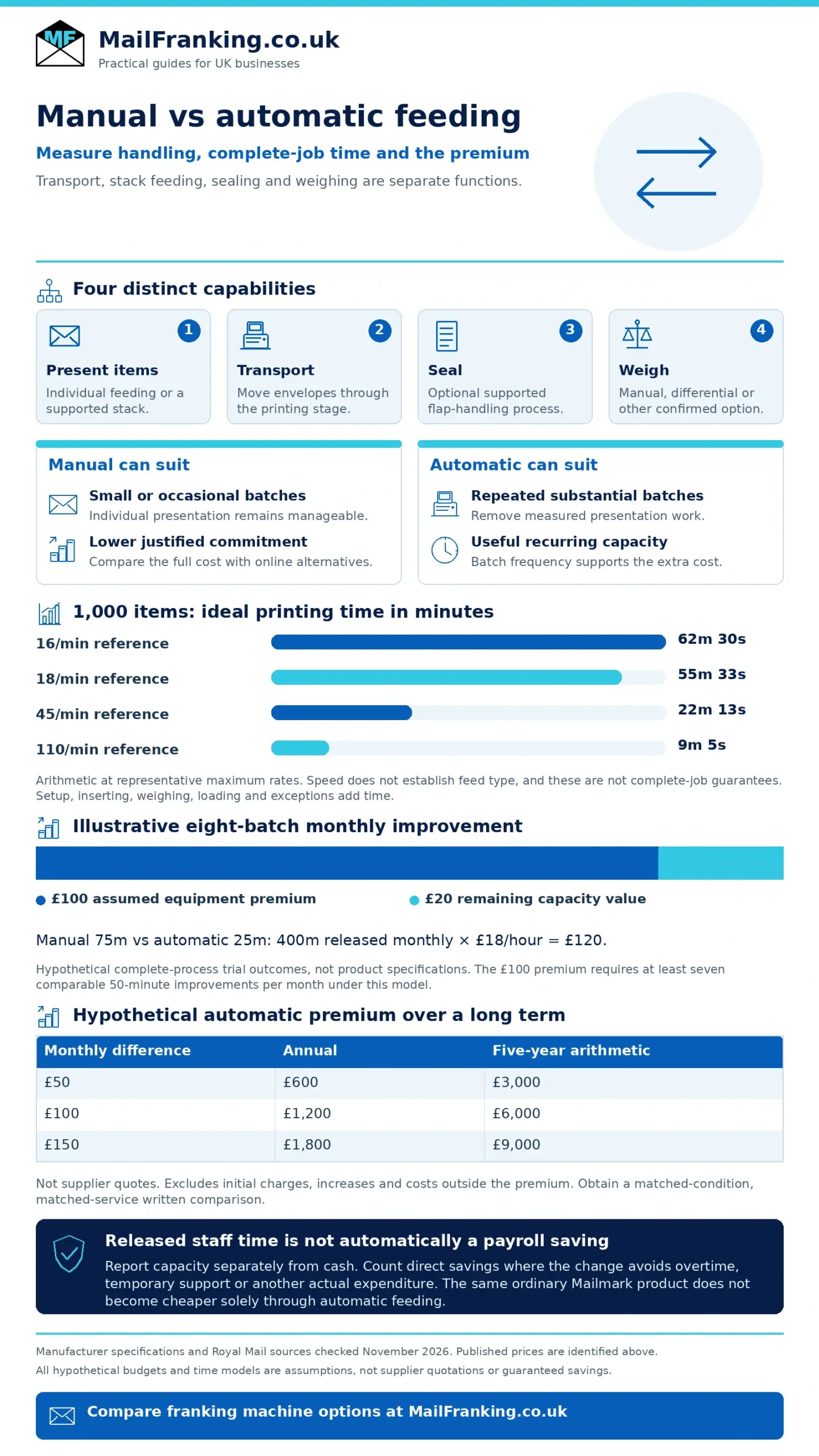
| Ideal continuous printing example: 1,000 items | Time at stated reference rate |
|---|---|
| 16 letters per minute | 62 minutes 30 seconds |
| 18 letters per minute | 55 minutes 33 seconds |
| 45 letters per minute | 22 minutes 13 seconds |
| 110 letters per minute | 9 minutes 5 seconds |
These are arithmetic examples using representative advertised rates, not guaranteed batch times or proof that every machine at a given speed has a particular feed type. A manually fed 45-per-minute machine and a stack-fed system can leave very different operator tasks.
Break the job into printing documents, folding, inserting, addressing, sorting, weighing, franking and handover. Measure each stage or at least define clear start and finish points. An equipment upgrade only saves the work it actually changes.
If inserting consumes most of the time, an envelope feeder alone may have limited impact on total labour. Conversely, well-prepared uniform batches may reveal a strong feeder benefit. Our high-volume franking guide looks at the broader capacity decision.
A worked labour-value calculation
Suppose a representative 1,000-item batch takes 75 minutes through the relevant manual process and 25 minutes through the proposed automatic process. These are explicit hypothetical trial outcomes, not specifications for a named machine. The measured improvement is 50 minutes per batch.
At eight batches per month, that releases 400 minutes, or six hours 40 minutes. Using an assumed loaded staff cost of £18 per hour gives £120 monthly capacity value. If the automatic system’s complete premium is £100 a month, the model leaves £20 before other differences.
| Worked example | Assumption or result |
|---|---|
| Time saved per comparable batch | 50 minutes |
| Monthly batches | Eight |
| Monthly time released | 400 minutes |
| Assumed staff cost | £18 per hour |
| Capacity value | £120 per month |
| Assumed complete equipment premium | £100 per month |
| Modelled balance | £20 per month |
At that hourly assumption, covering a £100 premium requires five hours 33 minutes 20 seconds monthly. With 50 minutes saved per batch, seven comparable batches would exceed the threshold. Four batches would release only £60 of capacity value, leaving a £40 shortfall against the premium.
Capacity value is not automatically cash saving. If salaries and staffing remain unchanged, the benefit is time available for other work. Count cash savings where the change actually avoids overtime, temporary staff, outsourcing or another measurable expenditure.
Compare complete costs over the same term
Automatic systems can require more hardware, workspace and support, but there is no single universal premium. Request matching purchase, rental or finance proposals with the same condition, service standard and term. Keep one-off charges separate from recurring amounts.
The following hypothetical premiums are budgeting illustrations, not market quotes. They show the scale of a long commitment before considering annual price changes, deposits or end-of-term costs.
| Assumed automatic premium | Annual difference | Five-year arithmetic difference |
|---|---|---|
| £50 per month | £600 | £3,000 |
| £100 per month | £1,200 | £6,000 |
| £150 per month | £1,800 | £9,000 |
Published manufacturer prices can help where they match the proposed equipment. For example, the Pitney Bowes 2026 UK list contains specified refurbished machines and five-year weekly lease references. A refurbished C Auto figure should not be repurposed as a new price for every automatic machine.
Ask for equipment, feeder, sealer, scale, output handling, software, installation, training and ongoing support as separate confirmed items. Check ownership or return obligations, minimum term, notice deadline, automatic renewal provisions and price increases. An attractive weekly headline can conceal years of payments.
Postage prices do not fall simply because feeding is automatic
For the same eligible ordinary Mailmark service, format, weight and class, automatic feeding does not itself create a lower basic postage tariff. The equipment decision concerns handling and capability. Separately qualifying business-mail products have their own conditions and should be evaluated independently.
Under the Mailmark tariff effective 5 October 2026, ordinary 1st Class letters up to 100g cost £1.77 and 2nd Class cost 88p, each 3p below the corresponding stamp. A batch of 1,000 such letters saves £30 gross against stamps, regardless of the feeder’s labour benefit.
Some large-letter comparisons save more, but use the actual baseline. A 1st Class large letter up to 100g is £2.86 Mailmark against £3.30 by stamp or £3.20 standard online. That gives 44p or 34p respectively, before equipment, consumables and other costs.
For substantial standard-letter batches, investigate Business Mail Advanced only with its qualification, preparation and VAT rules included. A high-speed machine and a high monthly total do not automatically make every mailing eligible for a bulk discount.
Design a useful demonstration
Give suppliers the same sample list and explain your largest routine batch, busiest day, mix of formats and required services. Use finished envelopes with normal inserts. Include occasional thicker packs and any items that currently cause errors or manual intervention.
Agree the timing boundaries before starting. If one demonstration begins with fully sorted mail and another includes sorting and weighing, the resulting times are not comparable. Record the operator count, preparation assumptions, interruptions and rejected items alongside the total duration.
Ask a member of your own team to perform the common steps after basic training. Check screen clarity, comfortable feeding, account selection and correction of mistakes. A good system should remain usable when the usual operator is absent, rather than relying on one highly experienced person.
Test low credit, low ink, an interrupted batch and a changed service. Ask how completed items are distinguished from unprocessed ones after a fault. Recovery and accurate records are part of productivity; a fast uninterrupted run alone does not prove an efficient everyday process.
Space, maintenance and downtime
Measure the complete operational footprint, including trays, scales, input stacks, output mail and access for cleaning. Automatic feeders can extend the equipment well beyond the base unit. Check furniture loading and the route into the room before agreeing installation.
Request service terms covering the exact feeder and accessories, not just the meter. Clarify consumables, wear parts, labour, travel and restoration arrangements. An advertised response target may mean a callback rather than a repaired machine, so ask how urgent mail will be processed during an outage.
Budget for genuine compatible ink, labels and sealing supplies where applicable. Avoid assuming maximum impression yields apply to every printing pattern. A system printing messages on every item can have a different consumption profile from one printing only the required postage mark.
Connectivity, rate updates, licensing and postage funding still matter on either feed type. Keep the registered operating details current and understand unused-credit recovery before replacing equipment. Our guides to maintenance and franking licences explain those checks in more detail.
How to choose
Choose manual feeding where the demonstrated handling remains comfortable and the complete cost fits the workload. Choose a confirmed automatic configuration where it removes substantial recurring work, supports your mail and justifies its premium under realistic volume assumptions.
Keep postage savings, staff capacity and cash savings as separate lines in the decision. Recalculate for lower future volumes as well as busy periods. A suitable system should support the business through a normal month, not depend on the busiest demonstration batch to make the numbers work.
Frequently asked questions
A manually fed machine requires an operator to present envelopes individually. It may still assist transport or provide connected weighing and reporting features. The key distinction is the remaining handling task, not whether the machine is modern or has a touchscreen. Test the complete process using your actual mail.
No. Semi-automatic can describe assisted envelope transport while staff continue presenting individual items. Automatic stack feeding is a separate capability, as are sealing and weighing options. Ask the supplier to demonstrate each stage and identify included accessories in writing rather than relying on a broad marketing label.
Automatic feeding does not by itself lower the ordinary tariff for the same eligible Mailmark product. Its main benefit is handling capacity and reduced repetitive work. Separately qualifying postal products may have different prices and conditions, so assess those independently from the feeder and compare the same service and VAT basis.
There is no universal threshold. Batch size, frequency, preparation, operator time and the complete equipment premium all matter. Time a representative manual and automatic process, multiply the difference by actual batch frequency and compare the useful capacity value with the extra cost. Include quieter months and realistic future volumes.
Not necessarily. Feeders, sealers, differential weighing and dynamic weighing perform different tasks and may be optional or unavailable. Check the exact configuration and supported envelope stock. A demonstration should show the whole workflow, including exceptions, rather than implying that one automatic feature removes every manual stage.
Only where it avoids actual expenditure, such as overtime, temporary staff or outsourced preparation. Otherwise it represents released capacity for other work. Both can be useful, but they should be reported separately. Use a realistic staff-cost assumption and avoid treating every minute saved as a reduction in the salary bill.